
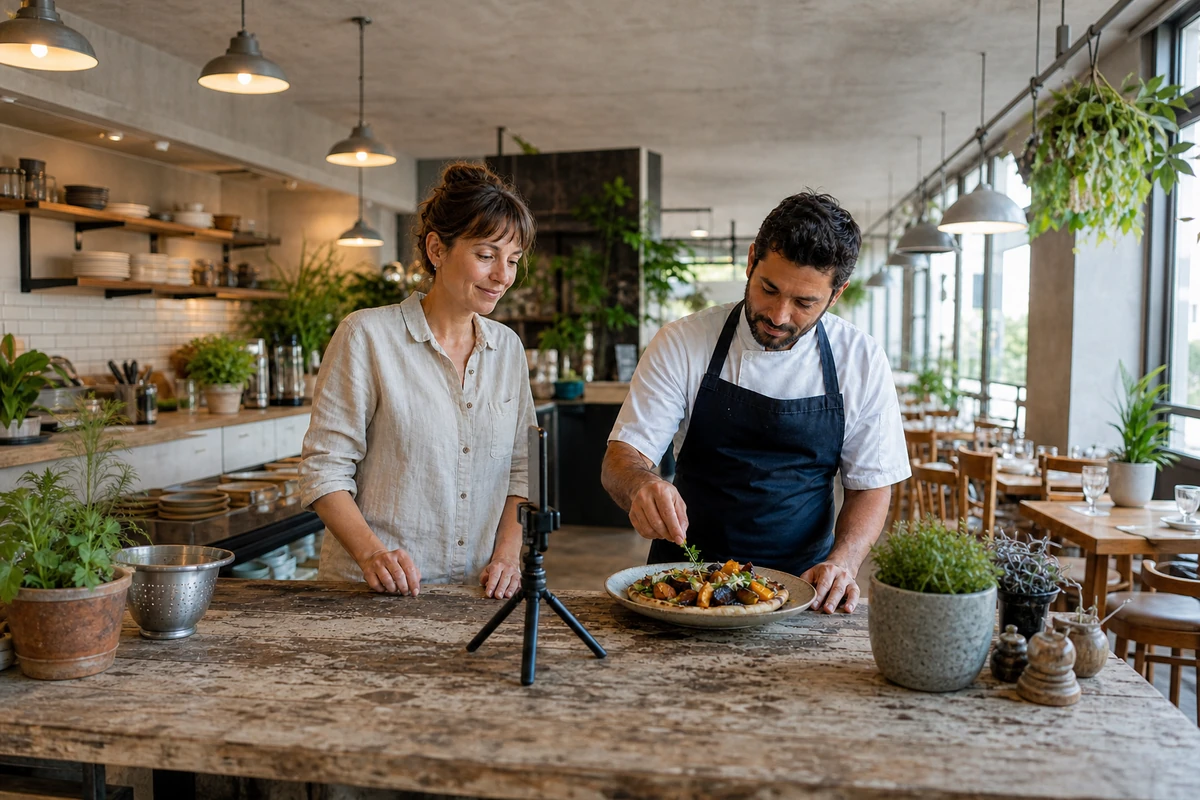
Start with one visit occasion and a short weekly capture session outside the rush. Record real food preparation, answer a common guest question, and show what the visit feels like. Turn those moments into a few useful posts with accurate details and one next step. Review staff time and guest response before expanding the routine.
Make content a small operating habit, not another full-time job
When the lunch rush is approaching, making a social post is rarely the most urgent job in the room. A manageable routine starts by shrinking the work: capture a few genuine moments during an existing preparation window, then use them to help a guest decide whether, when, and how to visit.
An October 6 contributed article in Modern Restaurant Management recommends authentic storytelling, useful social profiles, and an opt-in email list. Its author, Frank Vella, is the CEO of marketing supplier Constant Contact. Read that as a vendor perspective, not independent proof of restaurant results. The routine below is a suggested restaurant-level test, not a method the source demonstrated or a promise of more sales.
- Assign one person to capture material and one person to approve the final details; these can be the same person in a small team.
- Choose a quiet preparation window rather than asking staff to film during service.
- Set a time budget the restaurant can sustain even in a busy week.
Choose a real visit occasion before reaching for the camera
Give the week's content one practical job. That might be helping nearby workers understand the lunch menu, showing couples what an early dinner feels like, or explaining a weekend family option. The occasion should be something the restaurant can already deliver, not a promotion created only because a post needs a subject.
Write the guest question in plain language before recording: What can I eat on my lunch break? Is there a comfortable place for a small group? What makes this dish worth trying? That question gives the camera a purpose and makes it easier to leave unrelated footage out.
- Confirm the item, location, service window, price if mentioned, and availability with the team.
- Choose an occasion that fits the restaurant's food, room, and capacity.
- Avoid implying that a limited dish or event is always available.
Capture preparation, a useful answer, and the room
Use a small shot list instead of starting from a blank screen. Film a familiar food-preparation moment, record a short answer to the chosen guest question, and capture the setting a guest will actually encounter. A plated dish, a server's explanation, and a view of a comfortable table can give the week enough material without a separate production day.
Aim for honest usefulness rather than artificial polish. Show the portion and presentation guests receive. Keep the camera stable, check that any spoken answer is understandable, and avoid background conversations, guest information, or screens containing orders. Ask staff before filming them, and do not make a guest's participation a condition of service.
- Preparation: one appetizing action, such as finishing a dish or setting out fresh bread.
- Answer: one concise explanation that helps the guest choose.
- Setting: a truthful look at seating, arrival, or the intended dining occasion.
- Review: remove anything distracting, misleading, private, or unsuitable before posting.
Turn one capture session into a useful weekly sequence
Give each piece a different role. A preparation clip can introduce the food. A second post can answer the practical question. A later reminder can explain when the occasion is available and what the guest should do next. This is a suggested starting sequence, not an ideal posting frequency for every restaurant or platform.
Keep the caption specific: describe what is shown, add the relevant time or location, and provide one next step. A lunch invitation might lead to the current menu; a reservation occasion should lead to the matching booking page. Check the link and the profile details on a phone before relying on them. If a platform does not make caption links actionable, use its available profile-link or action feature and explain that path clearly.
Optional writing tools can help turn a manager's approved notes into a first draft. They should not invent ingredients, prices, opening hours, accessibility claims, or guest testimonials. A person who knows the restaurant must check the final wording.
- Keep a short folder of approved clips and photos labeled by dish and capture date.
- Reuse useful material with accurate context; retire it when the menu or availability changes.
- Do not post several near-identical clips simply to fill a calendar.
- Schedule only what the restaurant can still fulfill when the post appears.
Keep service and guest trust ahead of the content calendar
An effective routine should fit around hospitality. Stop filming when the kitchen needs the counter, the host needs to seat a party, or a guest would be made uncomfortable. Give staff an easy way to decline appearing on camera, and keep private notes, names, receipts, and conversations out of the frame.
Check the invitation with the people delivering it. If a post creates a recurring question, use the next piece of content to answer it rather than repeating the same message. If the dish sells out or the event changes, correct the guest-facing information promptly. A useful post should reduce uncertainty, not leave the team explaining an inaccurate promise.
- Prepare a short staff explanation for the featured occasion.
- Name the person responsible for availability changes and guest questions.
- Keep filming optional and away from essential service work.
- Invite voluntary newsletter signup only through a clear consent process; viewing a post is not permission to send marketing.
Review effort and guest response before adding more posts
Start with a limited trial that covers comparable service windows. Record time spent capturing, editing, approving, and answering questions. Alongside that workload, note useful responses: a guest asking about the featured dish, a menu visit, a completed booking, an order, or a voluntary signup. Keep those outcomes separate rather than treating every view as a visit.
Ask the team whether the content helped guests arrive informed and whether the featured occasion was easy to deliver. Review results against similar days while noting other influences, such as weather, holidays, nearby events, and separate offers. An increase does not establish that the posts caused it.
Keep the pieces that answer real questions and fit the time budget. Simplify the rest. The goal is a repeatable invitation that helps guests choose the restaurant, not a busier calendar with no clear benefit. For more visit-building ideas, explore the More Guests guide; for bringing an existing audience back, browse the repeat-visit guides.
- Record the featured occasion and the exact posts used during the trial.
- Separate content workload, online actions, and completed guest visits.
- Choose one improvement for the next cycle, such as a clearer answer or a more direct destination.
- Expand only when both the guest experience and the workload remain manageable.
Submit a restaurant or local business.
Share the business details, useful links, and what makes the place worth knowing for possible Restaurant Tech Report coverage.
FAQ
How often should a restaurant post on social media?
There is no universal frequency in this guide. Start with a small sequence the team can sustain, give each post a useful role, and review time spent and guest response before increasing the schedule.
Does a restaurant need expensive equipment to create useful content?
Start with the equipment already available and a stable, well-lit setup. Check whether the food is clear and any spoken answer is understandable. Consider additional equipment only after identifying a specific problem the current setup cannot solve.
Can AI write restaurant captions?
It can assist with a draft based on approved notes, but a person must verify ingredients, prices, availability, hours, and the invitation. Do not use generated copy to invent facts or testimonials.
How can a restaurant tell whether content is bringing in guests?
Track the actions closest to the invitation, then distinguish menu visits and enquiries from completed orders, bookings, and arrivals. Compare similar service windows and note other influences. Views alone do not prove visits or revenue.